


Chores 4 Rewards - Kids Chores
3.679.00 Reviews
App Specs
- Version
- 6.3.25
- Updated On
- License
- Free
- Downloads
- 10,000+
- Developer
- Harry Carter
- Categories
- Parenting
- Platform
- Android
Screenshots
 Analysis by AppCompare
Ever tried getting your kids to do their chores without a fuss? It’s like asking a cat to take a bath. Enter Chores 4 Rewards - Kids Chores, a nifty app that promises to make this Herculean task easier, or at the very least, a little less daunting. I decided to give it a whirl and see if it could transform my household chaos into a well-oiled machine.
When a chore needs a signal, not another reminder
The app’s biggest practical value is giving chores a visible place in the family routine. Instead of relying on a parent to remember every task and repeat every request, you can put responsibilities and their point values into a shared system. That shift can help when the same small jobs come up again and again, such as tidying a play area or helping with a regular household task.
I would use it most with children who understand a simple exchange: complete an agreed chore, earn points, and work toward a reward. It is less suited to a family that wants chores to remain entirely informal, or to parents who do not want routine responsibilities connected to incentives. The system works best when adults decide in advance which tasks are expected regardless of points and which ones are optional ways to earn them.
Making Chores Fun
The idea behind Chores 4 Rewards is pretty straightforward: turn tedious tasks into a game. You set up chores for your kids, assign them points, and once they’ve racked up enough points, they earn rewards. It’s like gamifying household duties, and honestly, it’s a genius idea. I mean, who wouldn’t want to be rewarded for doing something they already have to do?
Setting It Up
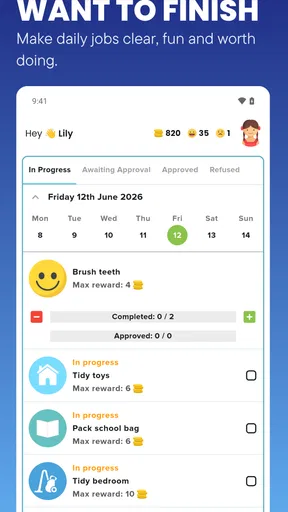
Getting started is a breeze. The app's interface is super user-friendly, which is a big plus in my book. You create profiles for each of your kids and add tasks to their lists. You can customize the frequency of chores, whether they’re daily, weekly, or just one-time gigs. Then, you assign point values to each task based on difficulty or time consumption.
For a smoother start, I’d avoid loading every household job into the app on day one. Begin with a short set of clear, age-appropriate tasks, then see which ones children can complete without extra explanation. This makes it easier to judge whether a chore is too broad: “clean your room” may need to be broken into smaller actions, while a specific task is easier for a child to recognize as finished.
Point values also need a little thought. If a quick task earns as much as a demanding one, children may focus on the easiest route; if the scale is too complicated, the system can become another negotiation. I’d keep the values simple and explain them once, then adjust only when a genuine mismatch appears. That makes the app a record of a family agreement rather than a fresh debate every afternoon.
Worth Reading Before You Choose

Flipboard Shows What News Apps Must Do Beyond the Feed

Switching to Android Auto Means Rethinking Your Driving Routine

Google Calendar Makes a Crowded Week Easier to Manage

Ludo King Makes the Most of the Minutes Between Plans

Baby Panda World Brings Quick Play to Modern Phones, but Its Game Library Feels Busy

ESPN’s Live Game View Makes Following Close Games Easier
Once the chores are completed, your kids can log them in the app, and voilà, they earn points! The app even allows you to set up a leaderboard to spark a little friendly competition among siblings. Trust me, nothing gets kids moving quicker than a little rivalry.
The leaderboard is a useful option only if competition suits your household. Some siblings find a shared score motivating; others may feel discouraged when they are younger, have different abilities, or simply care less about racing. I’d treat it as an optional nudge, not the heart of the system. If comparisons start causing arguments, the points can still serve as a personal progress marker without turning chores into a contest.
Rewards Galore
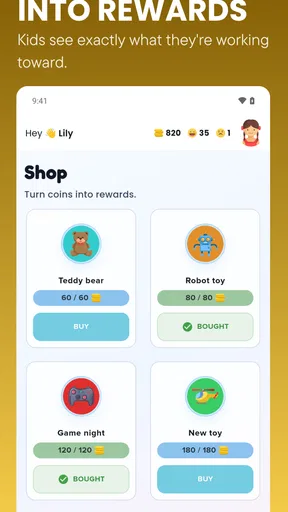
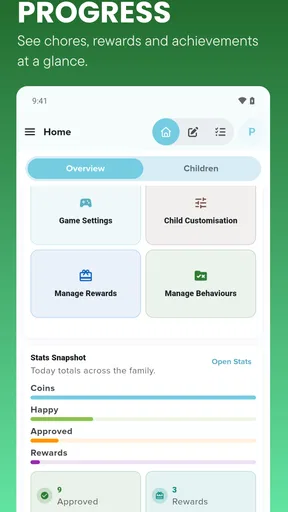
Speaking of rewards, this is where you can get creative. The app lets you set up a reward system where kids can cash in their points for goodies. Whether it’s screen time, a special treat, or a fun outing, the possibilities are endless. You can adapt the rewards to fit your family’s values and what motivates your kids the most. It’s like running your own little family economy!
One useful way to keep that family economy manageable is to choose rewards that are easy to deliver consistently. A reward that depends on a busy weekend or a purchase may be harder to honor than a shared activity or a privilege that fits naturally into the household schedule. Before children start earning, agree on what each reward means and when it can be used. That avoids the awkward moment when a child has enough points but the adults have not decided how to fulfill the promise.
I’d also be careful about making every ordinary responsibility earn a prize. The app can help make a new routine appealing, but parents may want to keep some basic expectations separate from rewards so children learn that contributing is part of living together. A balanced setup can reserve points for specific jobs or extra help, while keeping everyday self-care and family rules outside the reward shop.
The Impact on Kids
I noticed a pretty significant change in my kids' attitudes toward chores. What was once a dreaded part of the day became something they actually looked forward to. The app encourages responsibility and independence, teaching kids to manage their time to earn their desired rewards. Plus, it’s a great way to instill a sense of accomplishment and work ethic early on.
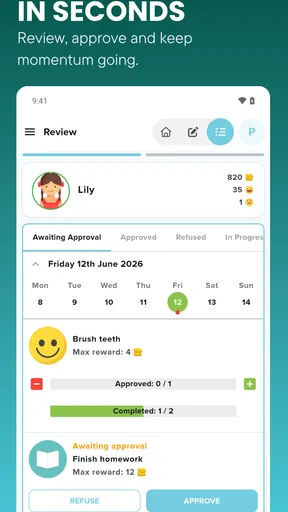
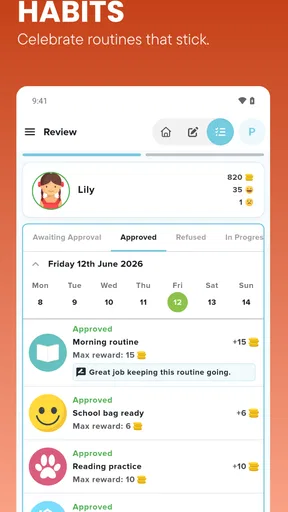
A realistic routine might be a child checking the list after school, choosing one task they can finish before dinner, and logging it when it is done. A parent can then review the result and decide whether it meets the family’s standard. This can reduce repeated verbal reminders, but it does not remove the need to teach a task, check quality, or help when a child is stuck. The app organizes the agreement; it cannot make a young child understand a job they have never been shown.
That distinction matters if you are hoping for a completely hands-off system. The app is more helpful as a prompt and a shared record than as a substitute for parenting. Early on, you may spend time walking children through the list and checking completion. Once chores become familiar, the routine can feel more independent, but that depends on the child and the consistency of the adults using it.
Parental Controls
As a parent, I appreciate the level of control the app gives me. You can easily adjust the point system or swap out rewards if something isn’t working. It’s also possible to add new tasks as needed, making it flexible and adaptable to real-life changes. And the best part? No more nagging needed! The app does a lot of the heavy lifting for you.
Those adjustments are especially useful when a family schedule changes. A one-time task can suit a weekend project, while recurring chores can support a normal routine; parents can revise the setup rather than treating the first version as permanent. I would still make changes calmly and explain them to the children. Changing point values after a task is completed can feel unfair, so it is better to agree on revisions before the next round begins.
Connectivity matters most at the moment a child or parent needs to check the list, record a completed chore, or review points. A phone can be a convenient household hub, but that convenience depends on being able to use the app when the family needs it. I would make sure the routine does not collapse into an argument if a device is unavailable: keep the task itself clear, and be ready to acknowledge a completed chore later if the app is not immediately at hand.
That is also a sensible approach when children move between rooms, go to a relative’s home, or share devices with adults. The app can help coordinate the reward routine, but the family should decide who records completion and how everyone knows the current expectations. In a household where children do not have their own device, a parent can be the person who checks entries together with them rather than expecting each child to manage the app independently.
Using it without letting the phone run the household
Because chores happen in ordinary, often busy moments, I would keep phone use brief and purposeful. Set up the plan when you have time, then let the child focus on the task rather than repeatedly checking a screen. For younger children in particular, a verbal reminder or a visible household routine may still be useful alongside the app; the digital list is most effective when it clarifies what to do, not when it becomes the only way a child can remember.
Families who are careful about children’s screen time may reasonably ask whether a chore system needs another app. The strongest case is when it replaces repeated negotiation with one agreed list and reward plan. If opening a phone creates more distraction than structure, a paper chart on the fridge may suit that family better. I see the app as a practical organizer for households that already use a phone to coordinate family routines, rather than a must-have for every parent.
It is free to get started, while in-app purchases range from $3.99 to $34.99 per item, so I would look at what is available and decide whether the basic approach meets your needs before spending. The app is made by Harry Carter, has an Everyone age rating, and has been available since April 14, 2021. Its current version is 6.3.0, and it requires Android 7.0 or later. Those details make it straightforward to judge whether it fits your device and household, but the important test is still whether your family likes the routine it encourages.
Room for Improvement
While Chores 4 Rewards is pretty stellar, there’s always room for a few tweaks. I’d love to see more options for tracking long-term progress or setting bigger goals that teach kids about saving up for larger rewards. Also, a community feature where parents can share tips and ideas for rewards could be a nice addition.
That limitation shapes how I would use it: I would not rely on the app alone to teach long-range budgeting or track a child’s development over a long period. Parents can still talk through saving points toward a larger reward, but they may need to keep that goal visible in their own way. If detailed charts, family-wide planning tools, or a social exchange of ideas are the main things you want, a different chore planner or a simple shared calendar may be a better match.
Compared with a paper chart, this app offers a more interactive way to record chores and connect them to points and rewards, while a chart is easier to glance at without opening a phone. Compared with a general family calendar, the app is focused on assigning chores and motivating children rather than coordinating every appointment and household plan. The right choice depends on the problem: use this when motivation and a child-friendly reward structure are central; choose a plain chart or calendar if you mainly need a low-tech reminder system.
Final Thoughts
Overall, Chores 4 Rewards - Kids Chores is a fantastic tool for any parent looking to make chore time less of a battle and more of a collaborative experience. It’s not just about getting things done; it’s about instilling valuable life lessons in a fun and engaging way. So, if you’re ready to transform your household dynamics, give this app a shot. Who knows? You might just find yourself with a few extra moments of peace and a cleaner house to boot!
It has an average rating of 3.5 from around 214 ratings, with 79 written reviews and over 10,000 installs. I’d read those reactions as a sign that it has found an audience without assuming it will suit every family. The most important question is whether your children respond well to points and whether you are willing to keep rewards clear and consistent. If so, this parenting app can give chores a more organized, encouraging shape. If your family prefers no incentives, minimal screen involvement, or detailed long-term tracking, I would choose a simpler approach instead.
Pros
- Engaging reward system for kids.
- Customizable chore lists.
- User-friendly interface.
- Parental controls included.
- Encourages positive behavior.
Cons
- Limited free version features.
- Requires internet for updates.
- No voice command support.
- Ads in free version can be intrusive.
- Limited integration with other apps.
FAQs for Chores 4 Rewards - Kids Chores
What is Chores 4 Rewards - Kids Chores, and how does it work?
Chores 4 Rewards - Kids Chores is an app designed to help parents manage and track their children's chores and responsibilities. By assigning tasks and offering rewards, the app motivates kids to complete chores. Parents can set up profiles, assign chores, and track progress, while kids earn points or rewards for completing their tasks.
Is Chores 4 Rewards - Kids Chores suitable for all ages?
Yes, the app is designed to be flexible and can be customized to suit children of various ages. Parents can set age-appropriate chores and rewards, making it versatile for families with kids in different age groups. The interface is user-friendly, catering to younger children while still being engaging for older kids.
Can I customize the rewards in Chores 4 Rewards - Kids Chores?
Absolutely! The app allows parents to customize rewards to fit their family’s unique needs and preferences. You can set tangible rewards like toys or outings, or intangible rewards such as extra screen time. This flexibility makes it easy to incentivize kids based on what motivates them most.
Is there a cost associated with using Chores 4 Rewards - Kids Chores?
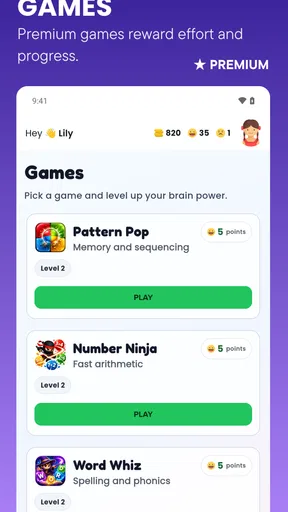
The app may be available as a free download with basic features. However, there might be in-app purchases or a subscription model for premium features, such as advanced tracking, custom chore lists, or additional reward options. Check the app store for detailed pricing information before downloading.
How secure is the data in Chores 4 Rewards - Kids Chores?
Data security is a priority for Chores 4 Rewards. The app typically uses encryption to protect user data, ensuring that your family's information is kept private and secure. It is advisable to review the app's privacy policy and permissions to understand how your data is managed and protected.


